Agent Orchestration.
Build a multi-agent AI Newsroom as a graph-based pipeline. A Planner, a Researcher, and an Editor-in-Chief, wired together with the ADK 2.0 Workflow API.
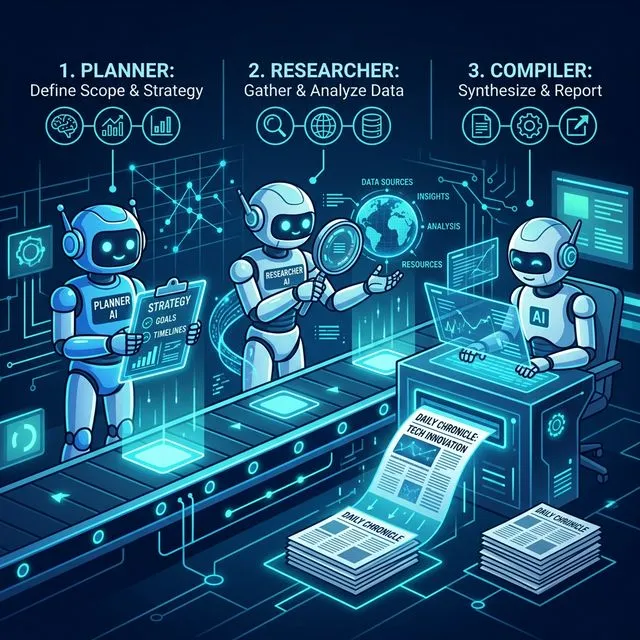
In this module you’ll move beyond a single agent and build a multi-agent AI Newsroom as a graph-based pipeline.
A Planner breaks down a broad user request into specific Google Search queries. A Researcher runs those queries with the built-in google_search tool. An Editor-in-Chief synthesizes the findings into a final newspaper. The whole thing is wired together with the new ADK 2.0 Workflow graph API.
[!NOTE] Heads up — this is the ADK 2.0 Workflow API version of the workshop. It targets the official ADK 2.0 release (
google-adk>=2.0.0). See the ADK 2.0 overview for the full graph API.
Architecture
flowchart LR
    START([START]) --> P[planner_agent<br/>LlmAgent · output_schema=SearchPlan]
    P -->|SearchPlan dict| R[research_agent<br/>LlmAgent · tools=google_search]
    R -->|raw research text| C[compiler_agent<br/>LlmAgent · pro model]
    C --> END([Final newspaper])
The pipeline is a Workflow with three linear edges. Each node’s return value becomes the next node’s node_input — no {state_var} interpolation, no output_key plumbing for intermediate steps. See adk.dev/workflows/data-handling for the exact data-flow rules.
Before You Begin
Ensure your workspace is synchronized with the starting state for this module:
make catchup module=02[!NOTE] After running
make catchup module=02, your workspace contains the mod01 solution — a singleAgentwithget_weatherandget_current_server_timetools. Mod02 replaces this design entirely with a multi-agent Workflow, so you can delete (or comment out) the existingroot_agent,app,get_weather, and theAgent/Gemini/typesimports as you build up the new pipeline. Theimport datetimeline andget_current_server_time()helper are still used.
Your Objectives
1. Centralize the model strings
Pin the two model strings near the top of workspace/app/agent.py, just below the imports. We use a fast worker model for the planner/researcher and a stronger pro model for the final write-up.
worker_model = "gemini-3.7-flash"
pro_model = "gemini-3.1-pro-preview"
[!NOTE]
import datetimeand theget_current_server_time()helper are already in your starter file (it’s the Module 01 solution). Keep them — the planner uses the current date to focus on recent news. Don’t paste them again.
2. Build the Planner with a structured output schema
Use output_schema with a Pydantic model. ADK forces the model to emit a JSON object matching the schema, and the next node receives it as a dict — no string parsing required.
from pydantic import BaseModel, Field
from google.adk.agents import LlmAgent

class SearchPlan(BaseModel):
    queries: list[str] = Field(
        description="2-3 very specific Google Search queries to research."
    )

planner_agent = LlmAgent(
    name="planner_agent",
    model=worker_model,
    instruction=f"""
    The current date and time is: {get_current_server_time()}

    You are a senior news editor. Given a broad news topic from the user,
    generate a structured plan of specific Google Search queries. Focus the
    queries on recent developments from the past 3 days unless the user
    requests otherwise.
    """,
    output_schema=SearchPlan,
)
3. Build the Researcher with google_search
ADK’s built-in google_search tool grounds the researcher’s output in real web results. Notice the instruction is now strictly a system prompt — no {search_plan} placeholder. The previous node’s output (the SearchPlan dict) is auto-injected as the LLM’s user message.
from google.adk.tools import google_search

research_agent = LlmAgent(
    name="research_agent",
    model=worker_model,
    instruction=f"""
    The current date and time is: {get_current_server_time()}

    You are a news researcher. The previous step has produced a SearchPlan
    with a list of queries. Execute a Google Search for each query and
    return a rough compilation of the facts you find.
    """,
    tools=[google_search],
)
4. Build the Compiler
Final agent in the chain. Uses the pro_model for writing quality, no output_schema (just emits text — Module 03 introduces structured NewspaperPage output).
compiler_agent = LlmAgent(
    name="compiler_agent",
    model=pro_model,
    instruction=f"""
    The current date and time is: {get_current_server_time()}

    You are the news editor-in-chief. Read the raw research provided as input
    and synthesize it into a cohesive, engaging final newspaper.
    """,
)
5. Compose the Workflow
The Workflow IS the root agent — no conversational outer LlmAgent, no sub_agents=[…] delegation. Just three edges that map predecessor outputs to successor inputs.
[!NOTE] Want a chat agent that calls this pipeline on demand instead of being replaced by it? A
Workflowisn’t anAgent, sosub_agents=[workflow]won’t work — you expose it as a function tool. See the Module 04 bonus: a conversational front door.
from google.adk.workflow import Workflow
from google.adk.apps import App

root_agent = Workflow(
    name="news_workflow",
    edges=[
        ("START", planner_agent),
        (planner_agent, research_agent),
        (research_agent, compiler_agent),
    ],
)

app = App(root_agent=root_agent, name="app")
adk.dev/workflows — full Workflow API reference.
Try it
make adk-web # ADK Web on :8500 — pick the `app` folder when promptedADK Web’s run pane shows the planner’s SearchPlan, the researcher’s tool calls, and the compiler’s final newspaper text. Exercise the pipeline with prompts like “Latest news on AI agents from the past three days.”
Resources
- ADK 2.0 overview — adk.dev/2.0 (install, the graph API mental model).
- Workflow API — adk.dev/workflows (nodes, edges, START — the mental model).
- Data flow between nodes — adk.dev/workflows/data-handling (how
node_inputis populated; structured output passing). - Google Search Grounding — docs.cloud.google.com/vertex-ai/…/grounding-with-google-search (display requirements; relevant once you produce structured citations in Module 03).
- Repo-internal cheatsheet —
.agents/skills/google-agents-cli-adk-code/references/adk-2.0.md(mostly accurate; seeGEMINI.md→ “ADK 2.0 Cheatsheet Overrides” for known errata).
Getting unstuck
If you fall behind or your code isn’t working, you can instantly catch up to the beginning of the next module by running:
make catchup module=03(Note: this completely overwrites your current workspace/ with the known-good baseline for the next module.)
To re-load the canonical Module 02 solution into your workspace:
make solve module=02